
If you have a child at secondary school, you have probably had the email by now. It comes from the safeguarding lead, usually late on a Friday, and it warns that pupils are using “dark web browsers” to reach “unregulated and potentially illegal content”. There is normally a line about monitoring, and a link to an information evening.
It is a well-meaning email. It is also, almost certainly, describing something your child has not done and would not much enjoy doing.
That is not a criticism of the school. The people writing those emails are working from the same news coverage as the rest of us, and “dark web browser” does sound like a thing you could install by accident, the way you install a game. So here is what it really is, how much effort it takes, and what is actually worth your attention.
There is only one piece of software people mean
When someone says dark web browser, they almost always mean the Tor Browser.
It is free, it is made by a nonprofit called the Tor Project, and it is a modified version of Firefox. Instead of connecting you straight to a website, it sends your traffic through several volunteer-run computers first, wrapped in layers of encryption, so that no single one of them knows both who you are and what you asked for. That is the whole trick. There is no secret menu.
Two things surprise most parents. The first is that it began with funding from the US Naval Research Laboratory, as a way of protecting government communications rather than hiding crime. The second is that using it is legal in the UK. Entirely legal. There is no law against the software, only against what a person might do with it — which is equally true of a phone, a bank account and a car.
That matters practically. When we treat a legal, rather dull piece of software as contraband, we make it interesting, and interesting is the one thing a fourteen-year-old cannot resist.
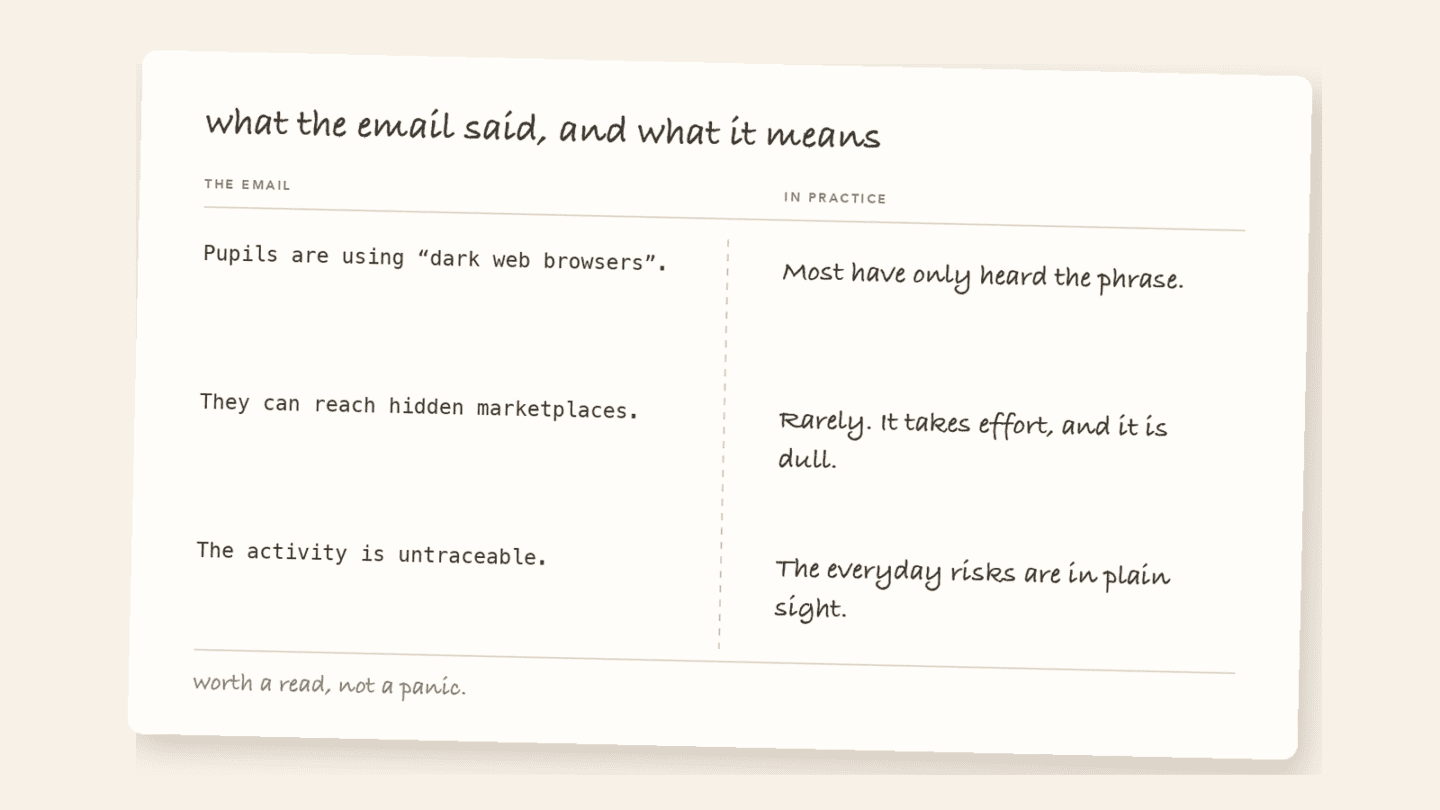
What the email says, translated. The gap between the two columns is most of the story.
How much effort would it actually take?
More than the email implies.
To get it running, your child would need to know the name, find the real site rather than one of the many lookalikes that serve malware, download an installer, and get past whatever is managing the device — a school laptop, a shared iPad, a phone with restrictions on it. Then they would have to use it.
Using it is the part that kills the appeal. Tor is slow. It strips out every convenience: no saved logins, no autofill, no recommendations, no feed built around them. Video stutters. Games want an account and low latency. The social apps want a phone number. What is left is a grey browser that takes eight seconds to load a page most adults could not name.
Most teenagers, handed Tor, would last about four minutes before going back to the app that actually works.
It is also worth asking where the idea would even come from. A child would have to hear about Tor somewhere: a video, a forum thread, a friend who heard it from an older cousin. That is not impossible. It is simply a longer chain of events than the email implies.
This is also where the boring parental controls earn their keep. A device that will not install unsigned software is doing more for you than a term of vigilance, because it removes the decision from a child who is not yet good at making it.
What the phrase is really doing
Here is the part worth knowing, because it changes how you read the next email.
“Dark web browser” is not the name of anything. There is no product by that name. It is a phrase that grew out of headlines and now bundles three unrelated ideas — anonymity software, illegal marketplaces, and untraceable activity — into one noun that sounds like a category of app.
So when a school email or a news bulletin warns about a dark web browser, it is describing one program that most teenagers have never installed, and would find thoroughly boring if they did. The software is real. The phrase is doing something else, and the something else is fear.
This is not a quibble about words. If you spend the term watching for a piece of software nobody in your house owns, you miss what is actually happening: a link in a group chat, at nine at night, on a phone, with a login box on the other side.
What is actually worth worrying about
The ordinary risks are unglamorous, and far easier to reach.
Account theft is the big one. A game account holding a decade of purchases and a rare inventory is worth real money, and the scam that takes it is simple. A friend’s account gets compromised, the attacker messages everyone on their list in that friend’s voice, and asks for a quick loan or a login to help with something. No dark web involved. Just a message from someone your child trusts.
Then the free-skins and free-currency offers, which are the most effective thing on the internet aimed at children, because they promise exactly what a child wants at exactly the price a child can afford. The link goes to a login page that is not the real one, and the credentials go straight into someone else’s list.
And the ordinary things: strangers in DMs, group chats with no adult anywhere near them, apps that ask for a location and are given one.
All of it happens in apps you already know about, on devices you have already seen, in daylight.
If something does happen, the response is unglamorous too. Change the password on the email first, because everything else resets through it, then the game account. Turn on two-step verification using an app rather than a text message, and sign out every device. Then tell the school, even if it feels embarrassing. They see the same scams every week and can usually tell you which one it was.
What to ask instead
Banning a browser is easy and mostly pointless. Asking better questions is harder, and it works.
The six below are not a checklist to run in one sitting. They are a way of making the conversation ordinary, so that the one time something does go wrong, your child already knows it is a thing you talk about.

Six questions that do not sound like an interrogation.
When it is worth knowing about
There are real reasons a person might use Tor, and some of them apply to teenagers.
A child questioning their sexuality in a house where that is not safe to ask about. A teenager looking up a medical condition they do not want sitting in a shared search history. A young person trying to leave a relationship and needing to find something out without being seen doing it. Journalists, researchers, and anyone living where the internet is filtered.
That is the interesting thing about this software. It is not for people with something to hide. It is for people who cannot afford to be seen. Those are different categories, and the difference is the whole argument.
Parents use it too, for the same reasons. Looking up a diagnosis before telling anyone. Reading about leaving a job, or a marriage, or a country. The software does not care who needs it.
It is also worth being honest that Tor is not a magic shield. It hides where a connection comes from. It does not stop a person typing their own name into a form, or trusting the wrong stranger, or sharing a photograph they will regret. The tool is only ever as sensible as the person using it.
The boring truth
Your child is almost certainly not on the dark web. They are on their phone, in a group chat, being advertised at, and occasionally being messaged by someone they should not be talking to.
That is the thing to watch. It is much less dramatic than the email, and much more likely to matter.
Notes for the editor
- Voice: second person, British spelling, no invented anecdotes.
- Links: two contextual, both to privacyforged.com/tor-browser/.
- Images: two original illustrations, also supplied as separate PNGs.
- Angle: reassurance, not dismissal. No marketplace or address named.



Leave a Reply